
HTTP CONNECT tunnel
HTTP CONNECT is the request method defined in RFC 9110: the client asks an HTTP proxy to connect to a given port on the target host, and after a 2xx reply the proxy only forwards bytes blindly in both directions. Reaching HTTPS sites through an HTTP proxy relies on this tunnel.
Definition
CONNECT is an HTTP request method currently defined in RFC 9110, section 9.3.6. Instead of asking the proxy for a web page, the client asks it to open a TCP connection to the target host. Once the proxy replies with a 2xx status it switches to tunnel mode and from then on relays bytes unchanged between the two sides until either side closes the connection.
When a client reaches an https:// URL through an HTTP proxy, it usually sends CONNECT first and then completes the TLS handshake with the target site inside the tunnel. The proxy therefore sees the host name and port being connected to, but not the encrypted path, request headers or page content.
407 Proxy Authentication Required is the status a proxy returns when it requires authentication, and it often appears at the CONNECT step. It means the proxy did not accept the credentials, the tunnel has not been built, and the request has not reached the target site.
How the tunnel is set up
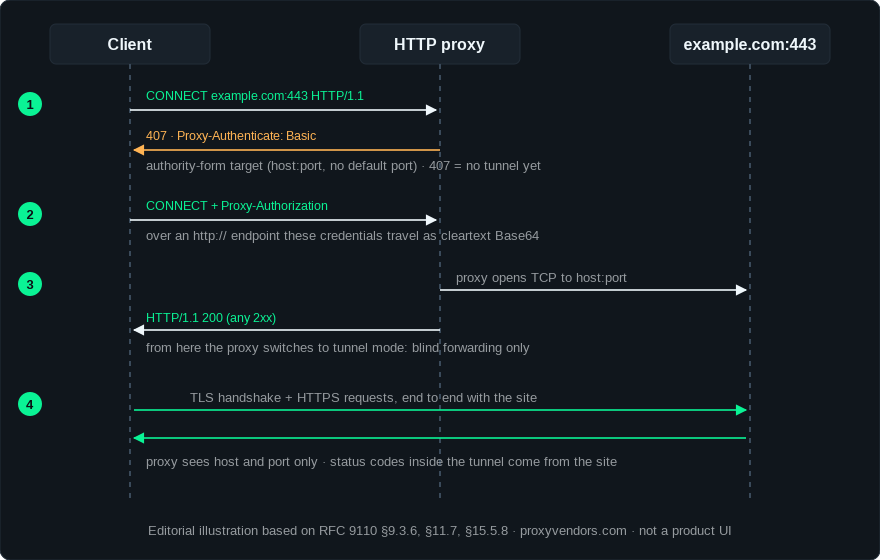
- The client connects to the proxy port and sends a CONNECT request. The request target contains only the host and port, which RFC 9112 calls authority-form, for example example.com:443. CONNECT has no default port, so the port must always be given.
- If the proxy requires authentication it replies 407 and names the scheme, such as Basic, in the Proxy-Authenticate response header. The client then resends CONNECT with a Proxy-Authorization request header.
- The proxy checks the credentials and the target port, then opens a TCP connection to the target host or passes the CONNECT on to the next proxy. On success it replies 2xx, usually 200; any other status means the tunnel was not established.
- Once the tunnel is up, the client performs the TLS handshake with the target site inside it and exchanges HTTPS requests. The proxy only forwards the encrypted bytes, and responses to CONNECT itself are not cacheable.
What it is good for
- Reaching HTTPS sites through an HTTP proxy. With a provider’s http:// host-and-port endpoint, the client automatically uses a CONNECT tunnel when it requests an https:// address.
- Keeping TLS end to end. Page content stays encrypted between the client and the target site; the proxy and networks in between see only the target host name and port.
- Carrying other TCP protocols through an HTTP proxy. For example, curl’s CURLOPT_HTTPPROXYTUNNEL (--proxytunnel on the command line) sends every operation through a CONNECT tunnel, provided the proxy allows the port.
- Troubleshooting proxies. Reading the CONNECT response with curl -v shows whether the proxy refused the request (for example with 407) or the target site returned an error.
Statuses from the proxy versus statuses from the target site
| Where it appears | Example status | Meaning |
|---|---|---|
| CONNECT response (before the tunnel) | 407 | The proxy did not accept the credentials or, per the provider’s documentation, the traffic allowance is used up; the request never reached the target site. |
| CONNECT response (before the tunnel) | 2xx, e.g. 200 | The tunnel is established; data received afterwards comes from the target site. |
| CONNECT response (before the tunnel) | 400, 403, 502, etc. | Returned by the proxy, with provider-specific meanings such as a malformed request, a disallowed target or port, or no available exit. |
| HTTPS response inside the tunnel | 403, 429, etc. | Returned by the target site and unrelated to proxy authentication; usually tied to the exit IP, request rate or site policy. |
The exact cause of a 407 depends on the provider’s documentation. Decodo residential proxies, for example, return 407 both for wrong credentials and for an exhausted traffic allowance, and state the reason in the x-error-message response header.
Compared with plain HTTP proxy forwarding and SOCKS5
| Aspect | HTTP proxy forwarding (http:// URLs) | HTTP CONNECT tunnel | SOCKS5 |
|---|---|---|---|
| Request form | Full URL in the request line; the proxy sends the request on the client’s behalf | Only host and port; the proxy opens a TCP connection | Target address and port in a binary handshake |
| What the proxy can see | Full URL, headers and content | Target host name and port; HTTPS content is encrypted | Target address and port; whether content is encrypted depends on the upper-layer protocol |
| Proxy authentication | Proxy-Authorization request header | Also the Proxy-Authorization request header, sent with the CONNECT request | Username/password sub-negotiation during the handshake (RFC 1929) |
| Typical use | Reaching http:// sites | Reaching https:// sites, or relaying other TCP protocols over allowed ports | Any TCP; UDP relay where UDP ASSOCIATE is supported |
Limitations
- The leg to the proxy is not encrypted by default. With an http:// endpoint the CONNECT request and the Proxy-Authorization header are sent in cleartext, and Basic authentication is only Base64 encoding. To protect credentials, use the provider’s HTTPS proxy endpoint if offered: Oxylabs documents that adding https:// to the entry point encrypts the connection to the proxy entry node, but check that your client supports it first.
- Target ports are usually restricted. RFC 9110 advises proxies to allow only known ports or a configurable list of safe targets, and the curl documentation notes that proxies often allow only ports 80 and 443. Mail, SSH and similar ports may be refused by the provider.
- One tunnel is one TCP connection from the proxy to the target, so every request inside it shares the same exit. Rotating gateways usually need a new connection before the exit can change, and client connection reuse affects rotation; check the provider’s documentation for the exact rules.
- When CONNECT fails, clients report a tunnel error rather than a web page error. The curl output in Decodo’s documentation, for example, reads CONNECT tunnel failed, response 407, and the request never reached the target site.
- CONNECT is expressed differently in each HTTP version. RFC 9113 specifies that in HTTP/2 CONNECT turns a single stream into a tunnel rather than the whole connection; whether a proxy offers HTTP/2 or HTTP/3 endpoints depends on the provider and the client.
- RFC 9110 section 9.3.6 forbids Content-Length and Transfer-Encoding in successful 2xx CONNECT responses, and requires clients to ignore either field if received. HTTP/1.1 switches to tunnel mode after the empty line ending the response headers. Subsequent bytes must not be framed as an ordinary response body.
- Does Content-Length: 0 mean the tunnel has no data? No. Even if a proxy incorrectly includes it in successful CONNECT, do not discard TLS bytes or infer an empty webpage. Check for 2xx, then handle a tunnel; non-2xx has not established one. Focused review: 2026-11-21; earlier vendor facts retain their original dates.
Common misconceptions
- Myth: when you reach an HTTPS site through a proxy, the proxy sees the full URL. In fact CONNECT reveals only the host name and port; the path and content stay inside TLS unless the client trusts the proxy’s certificate and allows it to decrypt in the middle.
- Myth: a 407 means the target site blocked your IP. In fact the 407 comes from the proxy before any tunnel exists; check the username and password, endpoint and port, authentication method (credentials or IP allowlist) and remaining traffic first.
- Myth: a CONNECT tunnel encrypts traffic. In fact the tunnel only forwards blindly; encryption comes from the TLS inside it, and with an http:// endpoint the credentials on the leg to the proxy are in cleartext.
- Myth: an HTTPS proxy endpoint removes the need for CONNECT. In fact the HTTPS endpoint only encrypts the client-to-proxy connection; to reach an https:// site the client still sends CONNECT inside that encrypted connection.
- Myth: CONNECT is a type of proxy IP. In fact it is a connection method and has nothing to do with whether the exit comes from a residential, datacenter, ISP or mobile network.
Example
Below are the messages between a client and an HTTP proxy when reaching an HTTPS site: the first attempt carries no credentials and the proxy replies 407; with Proxy-Authorization added, the proxy replies 200 and opens the tunnel (credentials taken from the RFC 9110 example, host names are placeholders).
CONNECT example.com:443 HTTP/1.1
Host: example.com:443

HTTP/1.1 407 Proxy Authentication Required
Proxy-Authenticate: Basic

CONNECT example.com:443 HTTP/1.1
Host: example.com:443
Proxy-Authorization: Basic aGVsbG86d29ybGQ=

HTTP/1.1 200 Connection established
aGVsbG86d29ybGQ= is the Base64 encoding of hello:world and anyone can decode it, which is why credentials over an http:// endpoint are effectively cleartext. The reason phrase after 200 is chosen by the proxy; clients look only at the status code. On the command line, curl -v -x http://USER:PASS@proxy.example.com:8080 https://example.com/ shows the same exchange.
Related terms and pages
Examples of providers whose official documentation covers HTTPS endpoints or the meaning of 407:
Sources and checks
- RFC 9110 · §9.3.6 · CONNECT
- RFC 9110 · §11.7 · Proxy-Authenticate / Proxy-Authorization
- RFC 9110 · §15.5.8 · HTTP 407
- RFC 9112 · §3.2.3 · authority-form
- RFC 9113 · §8.5 · HTTP/2 CONNECT
- MDN · CONNECT
- MDN · HTTP 407
- curl · CURLOPT_HTTPPROXYTUNNEL
- Decodo · HTTP 407
- Oxylabs · HTTPS
Date checked: 2026-11-11
This page is compiled from public standards and documentation; no hands-on test was carried out.